




If a Bitcoin payment remains unconfirmed for hours, or even days, it can feel as though the transaction has disappeared. In most cases, however, the Bitcoin has not been lost. The transaction is usually still waiting in the mempool until a miner includes it in a block.
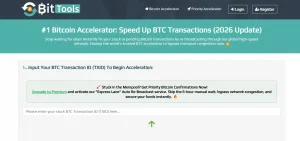
One of the quickest ways to improve the chances of confirmation is to use BitTools. The platform rebroadcasts a pending transaction to a large network of mining nodes, helping miners notice and prioritise it more quickly.
For readers searching for “bitcoin transaction to miners bittools”, this guide explains exactly what a stuck Bitcoin transaction means, how BitTools works, when it is useful, and what to do if it does not solve the problem.
Why Does a Bitcoin Transaction Get Stuck?
A Bitcoin transaction usually becomes stuck because the fee attached to it is lower than the current fee level being accepted by miners.
When a transaction is sent, it enters the Bitcoin mempool. This is a waiting area where miners choose which transactions to confirm. Miners generally select the transactions paying the highest fee first because that increases their reward.
What Happens When a Bitcoin Transaction Remains Unconfirmed?
An unconfirmed transaction stays in the mempool until one of three things happens:
- A miner includes it in a block
- The sender increases the fee using another method
- The transaction eventually expires and returns to the sender’s wallet
Bitcoin transactions with very low fees can remain pending for several hours or even several days during heavy congestion. In rare cases, the transaction may be removed from the mempool completely after a few days, allowing the sender to try again with a higher fee.
The Most Common Reasons a BTC Transaction Becomes Stuck
The most common causes include:
- The transaction fee was set too low
- The Bitcoin network suddenly became busy
- The transaction size was larger than expected
- The wallet used an outdated fee estimate
- The transaction reached only a small number of nodes
BitTools is designed to help with the final issue by making sure more miners see the transaction.
How Mempool Congestion and Low Fees Affect Confirmation Times?
When thousands of transactions enter the mempool at the same time, miners become more selective. During these periods, a fee that would normally confirm within ten minutes may suddenly become too low.
For example, if a transaction was sent at 8 sat/vB but miners are currently prioritising transactions paying 20 sat/vB or more, the lower-fee transaction may remain unconfirmed for a long time.
How Can I Tell If My Bitcoin Transaction Is Stuck?
Before using any accelerator, it is important to confirm that the transaction is genuinely stuck.
How to Check the Status of a Transaction Using a TXID?
Every Bitcoin transaction has a transaction ID, also known as a TXID. This is a unique string of letters and numbers.
To check the status:
- Open the wallet or exchange where the transaction was sent
- Copy the TXID
- Paste the TXID into a blockchain explorer such as Mempool.space
- Review the status and fee rate
If the explorer shows “Unconfirmed” and the estimated confirmation time keeps increasing, the transaction is probably stuck.
Signs That Your Bitcoin Transaction Is Not Confirming
A Bitcoin transaction may need attention if:
- It has been unconfirmed for more than one hour
- The fee is lower than the current recommended network fee
- The blockchain explorer does not predict inclusion in the next few blocks
- The recipient still cannot access the Bitcoin
When a Delayed Transaction Is Normal and When Action Is Needed?
Not every delayed transaction requires immediate action. Bitcoin blocks are created roughly every ten minutes, but some blocks take longer.
If the transaction was sent recently and the fee is close to the recommended rate, it may simply need more time.
However, if more than two or three hours have passed and the fee is far below current network conditions, using BitTools or another method is often worthwhile.
What Is BitTools and How Does It Push a Bitcoin Transaction to Miners?

BitTools is a Bitcoin transaction accelerator. It does not change the Bitcoin blockchain itself, and it does not require access to a wallet or private key.
Instead, BitTools asks for only one piece of information: the TXID.
How BitTools Works as a Bitcoin Transaction Accelerator?
Once the TXID is entered, BitTools rebroadcasts that transaction to a large network of Bitcoin nodes and mining partners.
According to BitTools, the service sends the transaction to more than 66 partner nodes and miners. This increases the chance that a miner will notice the transaction and include it in the next available block.
This process is often described as “pushing a Bitcoin transaction to miners”.
Why Miners May Prioritise a Rebroadcast Transaction?
A rebroadcast does not increase the transaction fee automatically. Instead, it makes sure the transaction reaches more miners and nodes.
This can help in situations where:
- The transaction did not spread widely across the network
- Local node congestion prevented miners from seeing it
- Some miners ignored the transaction because of low-fee filters
By increasing visibility, BitTools improves the probability of confirmation. However, it cannot force miners to include the transaction. Bitcoin miners still decide which transactions to confirm.
Is BitTools Safe and Legitimate to Use?
BitTools is generally considered safe because it never asks for:
- Private keys
- Wallet passwords
- Seed phrases
- Personal information
The service only needs the TXID. That means users remain in control of their wallet at all times.
How Do I Push a Stuck Bitcoin Transaction to Miners via BitTools?
The process is straightforward and usually takes less than five minutes.
Step 1: Find and Copy Your Bitcoin TXID
First, I open the wallet or exchange where I sent the Bitcoin and locate the pending transaction. Every Bitcoin transaction has a TXID, which is the unique transaction reference.
I copy the full TXID exactly as shown. Most wallets display it inside the transaction details page or under an option such as “View on Blockchain” or “Transaction Hash”. Without the correct TXID, BitTools cannot locate the transaction.
Step 2: Open BitTools and Enter the Transaction ID
Next, I visit the BitTools transaction accelerator page and paste the TXID into the search box.
BitTools then checks whether:
- the transaction is still unconfirmed
- it still exists in the mempool
- it is eligible for acceleration
If the transaction has already disappeared from the mempool, BitTools may not be able to help. In that case, the Bitcoin may need to be resent from the wallet instead.
Step 3: Choose Between the Free and Premium Option
Once BitTools has found the transaction, I choose either the free or premium accelerator.
The free option is usually enough if the fee is only slightly too low and the network is not extremely busy.
The premium option is more useful if:
- the transaction has been stuck for several hours
- the original fee was very low
- I need the Bitcoin to confirm urgently
For example, if my transaction fee is much lower than the current network fee, the premium service gives it a better chance of being seen by miners sooner.
Step 4: Rebroadcast the Transaction to Bitcoin Miners
After choosing an option, I submit the request.
BitTools then rebroadcasts the transaction to its network of Bitcoin nodes and mining partners. This does not create a new transaction or move the Bitcoin again. It simply sends the existing transaction to more miners so that it is more likely to be included in the next block.
This is why the process is often described as pushing a Bitcoin transaction to miners.
Step 5: Monitor the Transaction Until It Is Confirmed
Finally, I return to a blockchain explorer such as Mempool.space and search for the TXID again.
If the process works, the status should change from “Unconfirmed” to “Confirmed”. In many cases, this happens within 10 to 60 minutes, although it can take longer during periods of heavy network congestion.
Once the transaction receives its first confirmation, the Bitcoin has officially been added to the blockchain.
Which Transactions Can Be Accelerated Through BitTools?
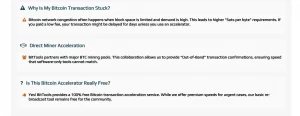
Not every Bitcoin transaction can be accelerated.
Transactions With Low Fees
BitTools is most effective when the original transaction fee is slightly too low but still reasonable.
For example, a transaction paying 12 sat/vB during a period where miners prefer 15 sat/vB has a good chance of being accelerated successfully.
Transactions Delayed by Mempool Congestion
If the network suddenly becomes busy, even a normal fee can become too low.
This often happens during:
- Large Bitcoin price movements
- Heavy exchange activity
- Major market announcements
In these situations, BitTools can help the transaction reach more miners more quickly.
Cases Where BitTools May Not Work
BitTools may not be successful if:
- The fee is extremely low, such as below 1 sat/vB
- The transaction has already been dropped from the mempool
- The wallet uses incompatible transaction settings
- Network congestion is exceptionally high
Confirmed fact: no accelerator can guarantee inclusion in a block because miners still choose which transactions to include.
What Are the Alternatives If BitTools Does Not Confirm the Transaction?
If BitTools does not work, there are several other methods available.
Replace-By-Fee (RBF)
If the wallet supports Replace-By-Fee, I can resend the same Bitcoin transaction with a higher fee. The new version replaces the original one in the mempool, making it more attractive to miners.
RBF is usually the best option when the original transaction fee was set far too low. Many modern wallets include a button such as “Increase Fee” or “Speed Up Transaction”, which uses RBF automatically.
Child-Pays-For-Parent (CPFP)
Child-Pays-For-Parent works differently. Instead of replacing the original transaction, I create a second transaction that spends the unconfirmed Bitcoin and attaches a much higher fee.
Miners often confirm both transactions together because the combined fee becomes worthwhile. CPFP is useful if the wallet does not support RBF but still allows spending of unconfirmed funds.
Wait for Network Congestion to Ease
Sometimes the simplest solution is to wait. If the Bitcoin network becomes less busy, miners may eventually confirm the transaction even without BitTools or a higher fee.
This often happens during quieter periods, such as overnight or after major market activity has slowed down. If the transaction is not urgent, waiting a few more hours may solve the problem naturally.
Contact the Wallet Provider or Exchange
If the transaction was sent from an exchange or hosted wallet, I may not have access to RBF or CPFP.
In that case, I can contact the wallet provider or exchange support team. Some services can rebroadcast the transaction themselves or increase the fee from their side. Others may provide their own built-in accelerator tools for delayed Bitcoin payments.
BitTools vs Other Bitcoin Transaction Accelerators
Several other accelerator services exist, but they do not all work in the same way.
| Service | Main Method | Free Option | Best Use |
| BitTools | Rebroadcast to 66+ nodes and miners | Yes | General stuck transactions |
| ViaBTC | Direct mining pool submission | Limited | Transactions meeting fee and size rules |
| Mempool Accelerator | Paid out-of-band fee | No free option | Urgent confirmations |
| BitAccelerate | Rebroadcast to multiple nodes | Yes | Lower-fee transactions |
ViaBTC only offers a limited number of free submissions every hour, while Mempool Accelerator focuses on paid priority confirmation.
For many UK users, BitTools is appealing because it is simple, does not require registration, and offers both free and paid options.
Common Misconceptions About Stuck Bitcoin Transactions

A Stuck Transaction Does Not Always Mean Funds Are Lost
This is one of the most common misunderstandings.
Confirmed fact: if the transaction is still visible in the mempool, the Bitcoin still exists and has not disappeared.
Rebroadcasting Does Not Guarantee Immediate Confirmation
Some websites claim that rebroadcasting “forces” miners to confirm a transaction.
That is misinformation.
BitTools and similar services only improve the transaction’s visibility. The final decision still belongs to the miners.
Not Every Unconfirmed Transaction Needs a Paid Service
Another common myth is that every delayed transaction requires a premium accelerator.
In reality, many transactions confirm naturally after a few hours. A paid option is usually only necessary if:
- The fee was very low
- The transfer is urgent
- The network is heavily congested
Conclusion: Is BitTools the Best Way to Push a Bitcoin Transaction to Miners?
For anyone searching for a practical way to solve a pending Bitcoin payment, BitTools is one of the simplest options available.
It is particularly useful when:
- The transaction is stuck because of a low fee
- The TXID still appears in the mempool
- The payment is urgent
- The wallet does not support RBF or CPFP
The phrase “bitcoin transaction to miners bittools” essentially means using BitTools to rebroadcast a transaction so that more mining nodes notice it.
Confirmed fact: BitTools can improve the chance of confirmation, but it cannot guarantee it.
If the fee is only slightly too low, BitTools may solve the problem quickly. If the fee is extremely low, methods such as RBF or CPFP may still be necessary.
Frequently Asked Questions
Can I use BitTools if my Bitcoin transaction is already several days old?
Yes, provided the transaction still appears in the mempool. If it has disappeared completely, the wallet may need to resend the transaction instead.
Does BitTools Work With Every Bitcoin Wallet?
BitTools works with most wallets because it only needs the TXID. However, some exchange withdrawals may not be eligible if the exchange controls the transaction.
Can I Accelerate a Transaction Without Paying?
Yes. BitTools and some other accelerators provide a free option. However, free services may take longer during periods of heavy congestion.
Will BitTools Refund Me if the Transaction Does Not Confirm?
Policies can change, so it is important to check the current BitTools terms before using any premium option.
What Is the Difference Between a Rebroadcast and a Fee Increase?
A rebroadcast sends the same transaction to more nodes and miners. A fee increase changes the transaction itself by paying a higher mining fee.
Can a Stuck Bitcoin Transaction Disappear Completely?
Yes. If a transaction remains unconfirmed for several days, some nodes may remove it from the mempool. When this happens, the Bitcoin usually returns to the sender’s wallet automatically.
How Many Confirmations Should I Wait for After Using BitTools?
One confirmation is often enough for small personal transfers. Larger payments and exchanges usually require between three and six confirmations.